
Secret Santa for teams
Office Secret Santa Generator for Work Teams, With a Wishlist for Every Name
WishDeck is a free office Secret Santa generator and app for work teams: the organizer creates a game with an exchange date and budget, shares one invite link, and every colleague draws a name and sees that person’s wishlist on iPhone, Android or the web. No spreadsheet, no guessing what a colleague wants, and no gifts that end up in a drawer.
- Set up in one minute
- Works for remote and hybrid teams
- A wishlist with every name
- Free
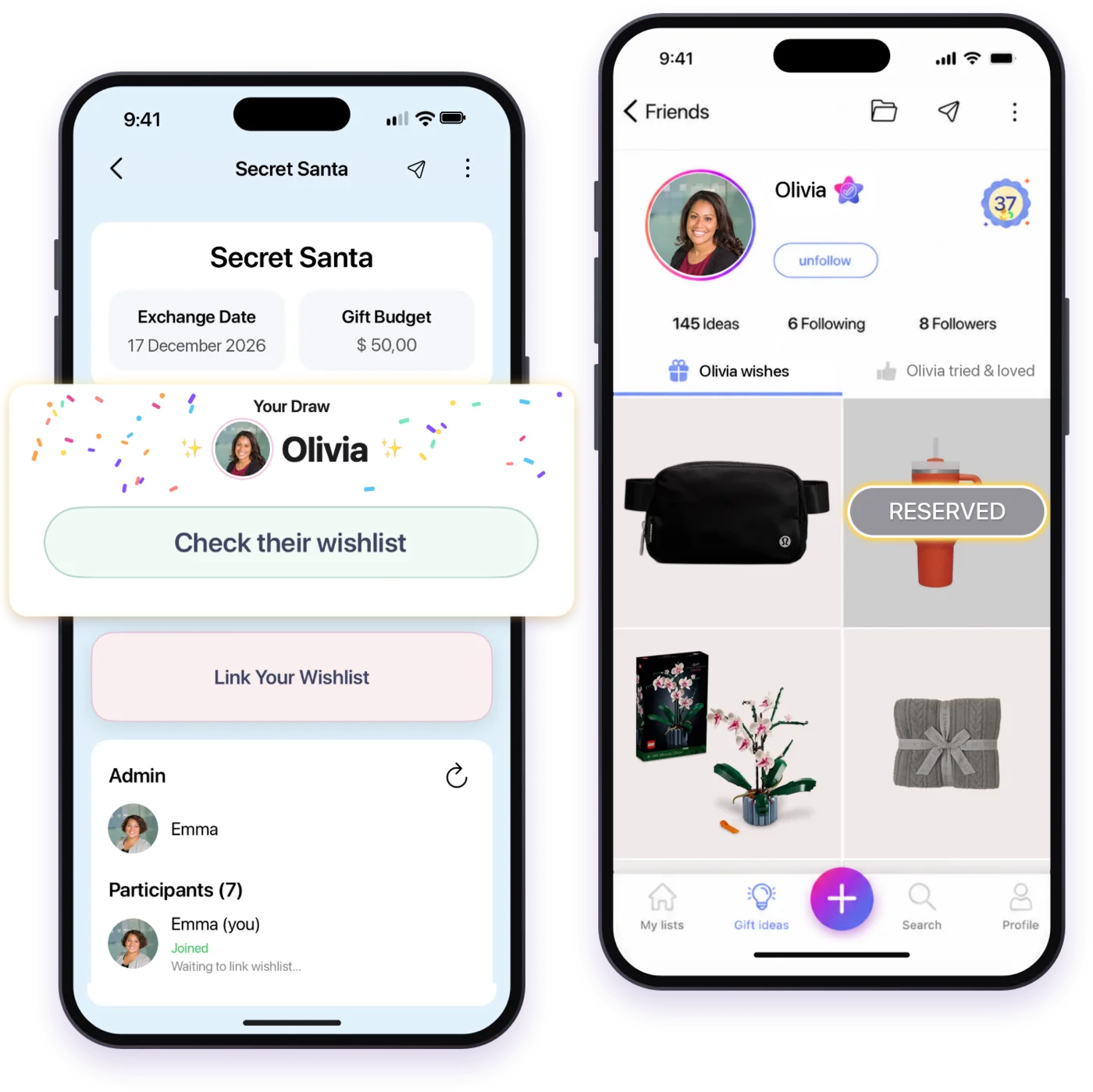
Choose how your team plays
One game works everywhere. The organizer can start on a laptop while colleagues join from their phones, so everyone uses whatever they already have.
In your browser
No download. Sign in and start the game right here at wishdeck.com/secret-santa, then share the invite link with your team.
Start in your browserOn your phone
Prefer the app? Scan the code with your phone camera and it opens the free WishDeck app in the App Store or Google Play.

Scan with your iPhone or Android phone


Already have an invite link? Open it on any device and pick your name.
How office Secret Santa works in three steps
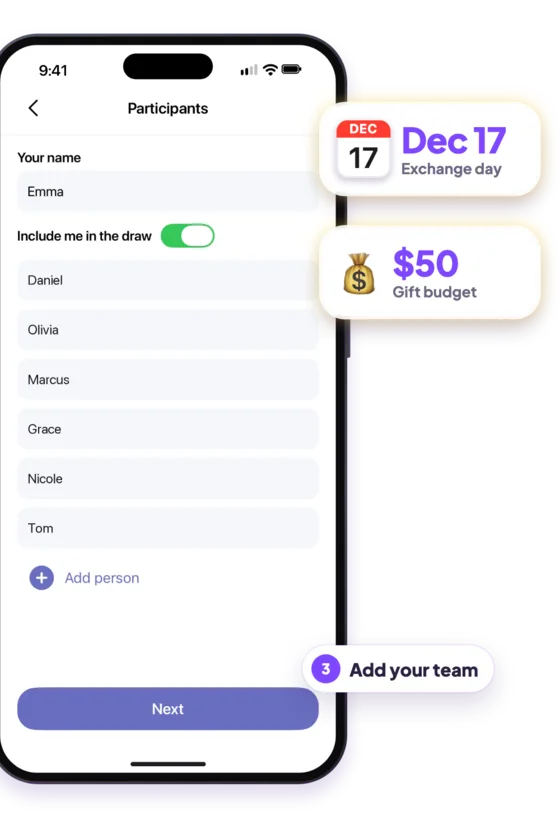
Create the game and add your team
Name the game, pick the exchange date and set the budget in Canadian or US dollars. Type in your colleagues’ names, include yourself if you are playing, and add exclusions, such as a manager and their direct report.
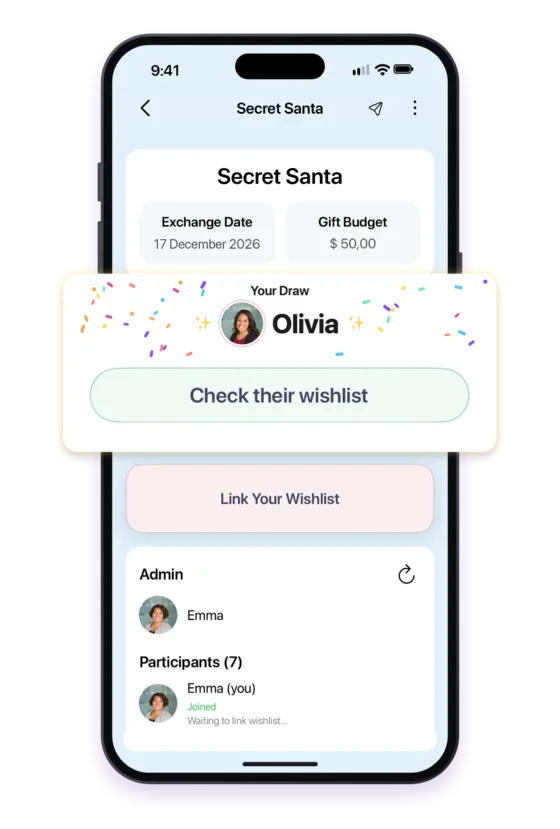
Share one link, everyone draws a name
Post the invite link in Slack, Microsoft Teams or an email. Each colleague picks their name and scratches to reveal who they are buying for. Nobody draws themselves, and everyone gives and receives exactly once.
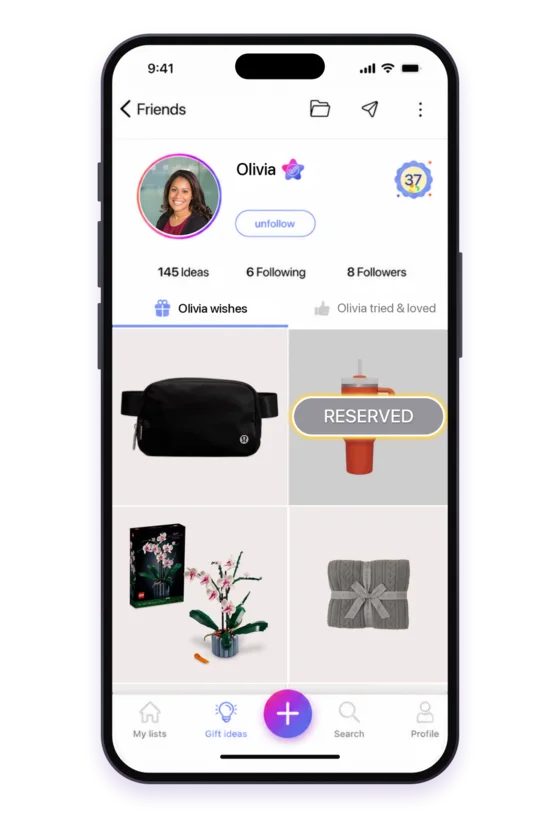
Open their wishlist and buy with confidence
Every name comes with that colleague’s wishlist, so you buy something they actually want, within the budget. The surprise survives: they never know which wish you chose, or who drew their name.
How WishDeck compares with the hat, the spreadsheet and generator sites
Most offices still draw names from a bowl and track the rest in a spreadsheet; remote teams often use a generator site. Here is what changes with WishDeck.
| What the organizer needs | WishDeck | Names in a hat + spreadsheet | Secret Santa generator sites |
|---|---|---|---|
| Three steps, about a minute, nothing to learn | ✓ | — | Varies |
| One invite link, no email addresses to collect | ✓ | — | Often needs every email |
| Works for remote and hybrid colleagues | ✓ | — | ✓ |
| Exclusions, like a manager and their report | ✓ | By hand | Most |
| Date and budget visible to everyone | ✓ | Scattered in messages | ✓ |
| A wishlist with every name: gifts from any store, with photos and prices | ✓ | — | Some |
| Reminders for people who have not joined | ✓ | By hand | Most |
| Canadian company, budget in CAD or USD | ✓ | — | — |
| Free on iPhone, Android and the web | ✓ | ✓ | Free, often with ads |
Everything the organizer needs, nothing extra
Exclusions that make sense at work
Keep a manager from drawing their direct report, or keep partners who work together apart. Each exclusion applies in one direction.
Budget and date in one place
Pick a preset or type your own amount in Canadian dollars, US dollars or another currency. Everyone sees the same budget and exchange date in the game.
One invite link, plus reminders
Share a single link in your team channel. See who has joined, and send a reminder to anyone who has not picked their name yet.
A wishlist with every name
Each player links a WishDeck wishlist with gifts from any store. Their Secret Santa opens it and picks something on it, and the surprise of which wish and from whom stays intact.
The organizer plays too
Include yourself in the draw like everyone else. If the team changes, edit the group and the draw runs again for everyone.
Built for hybrid offices
Colleagues in the office, at home or in another city play the same game. Agree on a ship-by date and the reveal works on a video call too.
How to organize Secret Santa at work: 7 rules that work
Most office Secret Santa problems come from unclear rules, not from the gifts. Settle these before you send the invite.
Make it opt-in
Invite people, do not sign them up. A game of willing players is more fun than a whole department that feels obliged.
Set a budget everyone can afford
Most workplace exchanges set $20 to $30, and $25 is a safe default. Put the amount in the game so nobody has to ask.
Draw names two to three weeks ahead
That leaves time to shop and ship. Office holiday parties usually fall in mid-December, so draw by late November.
Use exclusions
Keep managers from drawing their direct reports and keep partners apart. It avoids awkward gifts and the feeling of buying for the boss.
Ask everyone to link a wishlist
Three to five ideas inside the budget is plenty. It is the single biggest fix for gifts that end up in a drawer.
Plan for remote colleagues
Agree on a ship-by date about a week before the exchange, and allow gifts sent straight to a home address.
Keep it work-appropriate
No gag gifts that could embarrass someone and nothing personal. If in doubt, pick from the wishlist.
Need gift ideas? Secret Santa gifts for coworkers, white elephant gifts under $30 for the office party, the free Christmas list maker and the WishDeck wishlist app.
Made in Toronto, for teams across Canada and the US
WishDeck is a Canadian company built in Toronto. Set your budget in Canadian or US dollars, play on any device, and keep your office tradition simple this December.
Office Secret Santa questions
How do you do Secret Santa at work?
Pick an organizer, agree on a budget and an exchange date, and invite colleagues to opt in. Then draw names: with WishDeck the organizer creates a game, shares one link, and each person reveals who they are buying for in the app or browser. Ask everyone to link a wishlist, set a ship-by date for remote colleagues, and exchange gifts at the party or on a video call.
What is the best app for Secret Santa?
The best Secret Santa app draws names fairly, supports exclusions and shows each person a wishlist, so nobody guesses. WishDeck does all three for free on iPhone, Android and the web, and every name comes with a real wishlist of gifts from any store. Elfster and DrawNames are popular alternatives if you want to compare.
What is the best free Secret Santa generator?
For an office, choose a free generator that handles exclusions, works for remote colleagues and attaches a wishlist to each name. WishDeck is free: create a game, add at least three people, share the invite link, and everyone draws a name. Nobody can draw themselves, and everyone gives and receives exactly once.
Is there a Secret Santa generator that includes a wish list?
Yes. In WishDeck every participant links a wishlist to the game, so the person who draws their name opens it straight from the draw screen. Wishlists hold gifts from any store with photos, prices and links, and the person never learns which wish was chosen or who drew their name.
Can you do Secret Santa virtually?
Yes. A virtual Secret Santa works the same way as an office one: share the invite link in Slack, Microsoft Teams or email, let everyone draw a name online, and agree on a ship-by date about a week before the exchange. Gifts go to home addresses, and you open them together on a video call.
What is a good Secret Santa budget for work?
Most workplace Secret Santa games set a budget of $20 to $30, and $25 is a common default because everyone can afford it. Some teams go up to $50 when the group is small. Whatever you choose, put it in the game so every colleague sees the same amount.
What are some good Secret Santa rules to follow at work?
Keep it opt-in, set one budget, draw names two to three weeks before the exchange, and use exclusions so managers do not draw their direct reports. Ask everyone for a short wishlist, plan a ship-by date for remote colleagues, and keep gifts work-appropriate: no embarrassing gag gifts.
Does everyone need to download the app?
No. Colleagues can play in any browser at wishdeck.com/secret-santa, and others can use the free iPhone or Android app in the same game. Each player signs in with a free WishDeck account, which is how the app shows them their own draw and their Secret Santa’s wishlist.
How many people do you need for Secret Santa?
WishDeck needs at least three participants to draw names. There is no need to split a big group: a small team or a whole department can play in one game. If the team changes after the draw, edit the group and the names are drawn again for everyone.
Is WishDeck Secret Santa free?
Yes. Creating a game, drawing names, exclusions, reminders and wishlists are all free on iPhone, Android and the web. Optional WishDeck Premium features exist for wishlists, but you do not need them to run your office Secret Santa.
Run this year’s office Secret Santa in one minute
Free on iPhone, Android and the web. Create the game, share one link, and let every name come with a wishlist.