Highly recommend!
“WishDeck has completely changed how I organize my gift ideas. I keep all my wishes in one place and can easily share my lists with friends and family. Saves me so much time before holidays and birthdays.”
swetttikCanada

Create WishlistFind Gift Ideas
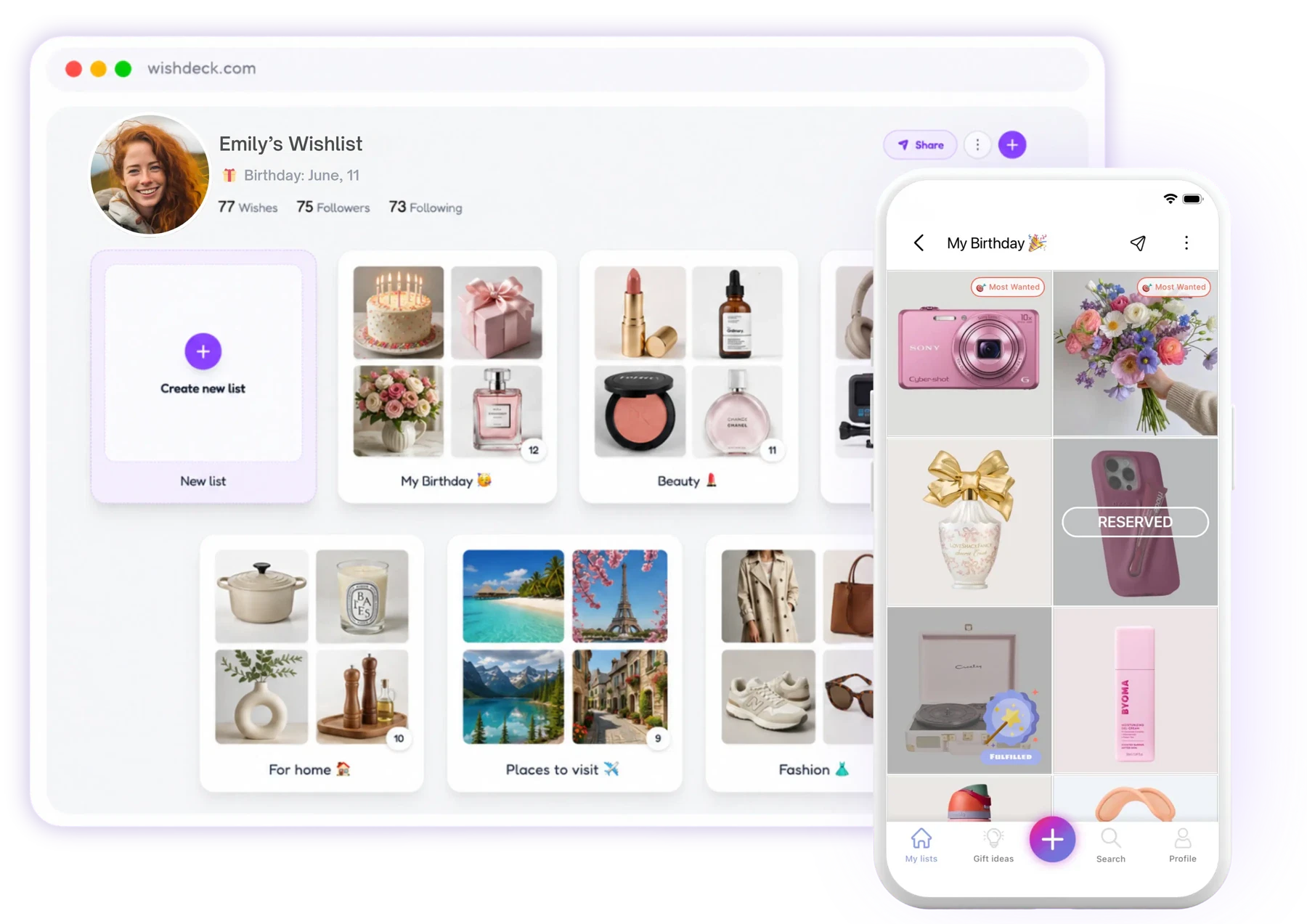
Create a wishlist for birthdays, holidays, and any occasion — and share it instantly.
WishDeck is a free wish list maker for iPhone, Android and the web.
Not sure what to gift? Let AI find the perfect gift ideas in seconds.
Free and easy


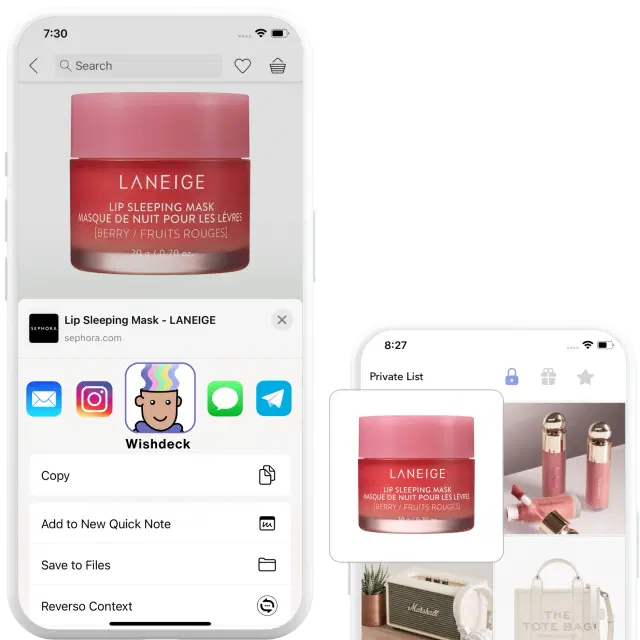
From any site – Amazon, Sephora or your favorite marketplace – tap Share → WishDeck (or paste the product link) to save your wish instantly.
Share your wishlist with friends or family — no app or sign-up required for them to see it. They can also secretly reserve gifts in the app.
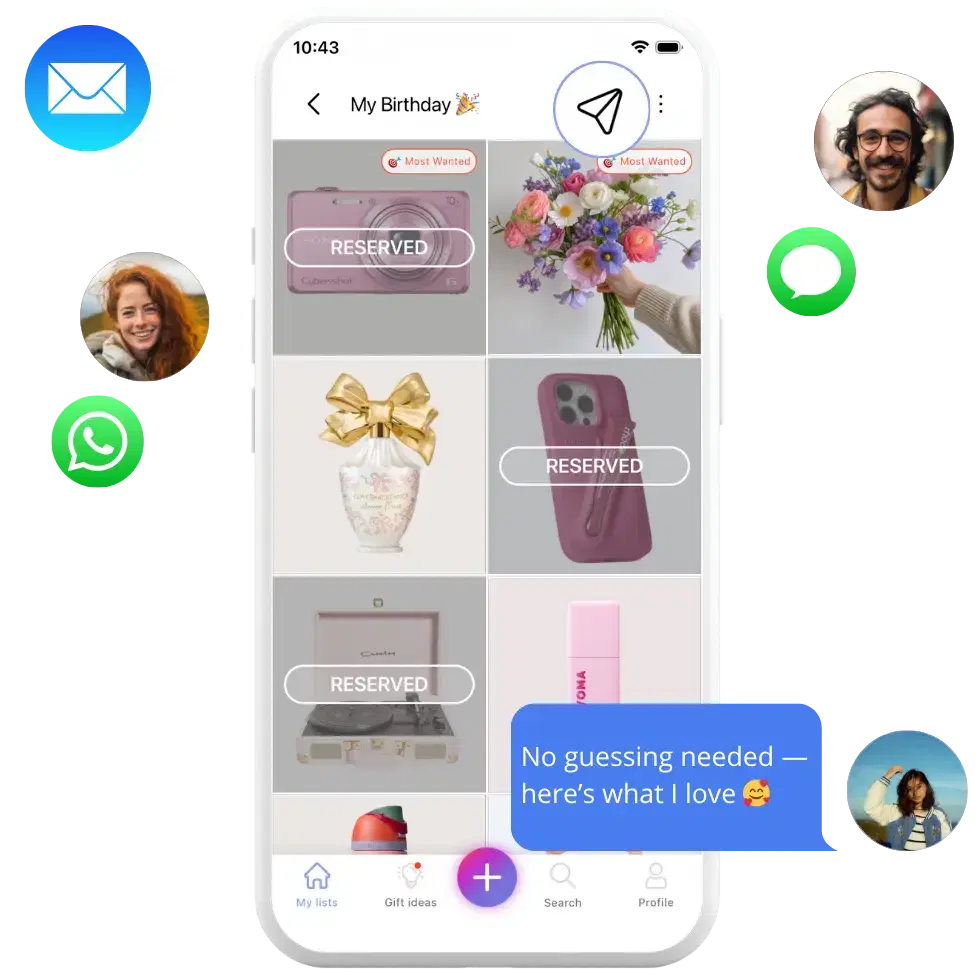
Sit back and smile as loved ones pick the items you really want — no guessing, no repeats, just perfect presents 😊

Why WishDeck
Rated 4.9 ★ on the App Store · 1 million+ wishes added by our users. Here’s what they say.
“WishDeck has completely changed how I organize my gift ideas. I keep all my wishes in one place and can easily share my lists with friends and family. Saves me so much time before holidays and birthdays.”
“Built a Black Friday list and stuck to it — no impulse buys this year. Friends can reserve my wishes secretly. Very useful app!”
“It really helped me choose the right gifts for my friends and family this holiday season. The recommendations were thoughtful and relevant — gift shopping faster and actually enjoyable.”
“We used it for the entire team to play secret Santa. It was fun!”
“Very convenient to just share a link with my family before the holidays. Also used it for office secret Santa — made things so much easier.”
“Wishdeck is a simple, easy way to keep track of all the things I want to buy or achieve. The layout is clean, nothing confusing, and it actually makes me want to come back and update my list.”
For creators
One link in bio: what they love, what they wish for, gifts reserved in secret. See how real creators use it, then make yours.



















@sophielouise1712, @milliekinsman and more

Onyx Coffee Advent Calendar 2026
Onyx Coffee advent calendar 2026: $189 early-bird (regular $220), 24 whole-bean coffees of 56 g, ships from Nov 16. Full lineup, order dates and 3 backups.

Nespresso Advent Calendar 2026
Nespresso advent calendar 2026: the Swarovski edition is $55 (Vertuo) and $50 (Original), 24 capsules, on sale in the US. Contents, release date, 4 backups.

Jellycat Christmas 2026
Jellycat Christmas 2026: released Aug 18 and Sep 15, the $98 Pinecone Tree, no advent calendar, plus 13 pieces from $25 to $98 checked Oct 25, 2026 →
Everything you need to know about creating wishlists, finding the perfect gift, and using WishDeck.
WishDeck is a free AI-powered wishlist and gift discovery platform available on the web at wishdeck.com and as iOS and Android apps. You can create unlimited wishlists for any occasion — birthdays, weddings, holidays, baby showers, anniversaries, or just a running list of things you love — and share them with friends and family in one tap using a simple link that works in any browser, no sign-up required. Add items from any online store by pasting a link or using the iOS share sheet, and let the built-in AI Gift Assistant suggest personalized gift ideas in seconds whenever you're stuck on what to give. Friends can silently reserve gifts on your list so nobody buys duplicates, and surprises stay surprises. Rated 4.9 on the App Store, WishDeck has been used to add more than 1 million wishes.
Yes — WishDeck is free to use on the web and on iOS. Create unlimited wishlists, share them with anyone, and try the AI Gift Assistant at no cost. The iOS app also offers an optional Premium upgrade that unlocks Circles (control which friends see each wish) and unlimited AI Gift Assistant searches.
You can create a wishlist on the web at wishdeck.com or in the iOS app — both work the same way. Just paste any product link (or tap Share → WishDeck on your phone) and WishDeck automatically pulls in the product image and description, so your list looks great with zero manual editing.
Yes. Every wishlist gets a shareable link (wishdeck.com/yourusername) that anyone can open in a browser — no app and no sign-up required. Friends and family can view your wishes instantly on any device.
The AI Gift Assistant uses what it knows about the recipient — their interests and what they've already wished for — to suggest personalized gift ideas in seconds. It's especially handy when a friend's wishlist gives you the direction but you want more ideas like the ones they already love.
Yes — both in the iOS app and on the web. Reserve any item silently from a friend's wishlist; the recipient never sees who reserved what, but other gift-givers will, so nobody buys duplicates. All your reservations live under Profile → Reservations, where you can see who you reserved for, extend a reservation for more days, or cancel it anytime.
Yes — WishDeck has a native Android app on Google Play, alongside the iPhone and iPad app. Your wishlists stay in sync across devices, and wishdeck.com also works in any browser — so you can create, view, and share wishlists on any device.
Yes. WishDeck works with any website — Amazon, Sephora, Nordstrom, Etsy, or your favorite small shop. Just tap Share → WishDeck on any product page (or paste the URL into WishDeck) and the item is saved with its image and description, ready to share.
Friends viewing your wishlist can see which items are already reserved (so they don't buy a duplicate), but they'll never see who reserved them. As the wishlist owner you don't see any reservations by default — surprises stay surprises. You can choose to reveal reservations to see what's been claimed, but you'll only see that an item is reserved, never who reserved it.
Yes. Go to Settings → Account Privacy to make your account friends-only — then only people you have approved as friends can see your wishlist. Every account also has both a Private list (only you see) and a Public list (open to everyone) by default, so you can keep some wishes truly personal while still sharing others openly.
Just create a separate wishlist and give it a clear name like "Birthday for Mom," "Kids' Christmas," or "Husband's Wishlist." Add the wishes meant for them, then share the link with whoever's gifting. Separate lists keep everything tidy — no mixing your kids' birthday wishes with your own — and let you share each one with exactly the right people.
Yes — with Circles, a Premium feature in the WishDeck iOS app. Create a Family Circle, a Best-Friends Circle, a Partner Circle — whatever fits — and decide which Circle sees each individual wish. So your family Christmas list stays family-only, and the wishes you saved for your partner's eyes only never accidentally show up in front of your coworkers.